Tuesday, November 4, 2014

Nokia X2 00 Auto Off or Restart in a Few Second Problem Solution

Nokia X2-00 Auto Off or Restart in a Few Second Problem Solution is possible with a few steps that i will write here in this post.Once you find this resistance that is the problem you can solve it.Nokia Asha 311 Signal Network problem solution jumpers

In above diagram you can see a red line that is telling you the resistance that you have to remove or replace.This replacement will solve Auto Off and Auto restart problem in Nokia x2-00

Monday, November 3, 2014

Troubleshooting LG Revolution Problems

Introduction

The LG Revolution smart phone runs on the Android 2.2 (Froyo) operating system and is built to run on the long term evolution (LTE) network. Common issues that can make life difficult with the smart phone include forgetting the unlock pattern, problems with apps, issues static during calls and more. Different issues can sometimes be resolved by various troubleshooting techniques, however, larger issues may need to be resolved by updating the operating system or restoring the phones factory settings.

The
The LG Revolution runs on the Android 2.2 Froyo operating system.
Source: Amazon.com

Forgot Unlock Pattern

Dont fret if you forgot the unlock pattern required to unlock your LG Revolution. After getting the unlock pattern wrong five times, a "Forgot Pattern?" button appears on the screen. Tap this button and then enter the username and password associated with the Google account that is associated with your smart phone.

Static or Echo on Phone Calls

  • Plug your LG Revolution in and charge it. If the battery is low, your may be hearing static because the phone doesnt have the battery power required to pull in a stronger signal.
  • Move your smart phone away from away from baby monitors, wireless routers, wireless headsets and any other devices that send or receive a wireless signal. Alternatively, you can turn these devices off. Additionally, if its possible, try changing the channel that those devices operate on.

App Problems

If an app is unstable (eg, random crashing or wont launch after you install it, try the following:

  • Uninstall and then reinstall the app. You can uninstall the app by opening the phones menu, selecting Settings, Applications and then Manage Applications. Select the app youre having problems with and then tap "Uninstall." Restart your phone and then reinstall the app.
  • Update the smart phones software, as outlined in the Update LG Revolution Firmware section.
  • Contact the apps developer to see if this is a known issue that theyre working on resolving.

Phone Beeps

If your LG Revolution is beeping, it could be caused by a few different issues:

  • The battery on your smart phone may be low. Charge it to see if that resolves your problem.
  • Check to make sure the beeping isnt a notification for a text message, e-mail or something else youve set up an audible notification for.

Update LG Revolution Firmware

Updating the firmware on your LG Revolution smart phone can restore known software issues with the device and even add functionality. You can update your devices software by doing the following:

  1. Tap the "Apps" icon, which features four dots on it.
  2. Choose "Settings."
  3. Tap "About Phone."
  4. Select "Software Update." A dialog box appears on the LG Revolution screen, notifying you whether or not a firmware update is available for your smart phone. Install any updates. The amount of time it takes to install the updates depends on the size of the update and the speed of your Internet connection.

Restore Factory Settings

  1. Shut down your LG Revolution smart phone.
  2. Hold down the "Power" and "Volume Down" buttons until a message appears on your smart phone asking you if you want to restore your phone to its factory default settings.
  3. Press the "Power" button. A message appears asking if youre certain you want to proceed with restoring your LG Revolution to its factory settings.
  4. Press the "Power" button one more time. The smart phone initiates the factory restoration and will restart a few times before finally booting up to the screen you saw the first time you powered the phone on.

Nokia E73 Insert SIM Card problem solution

The solution below shows the connection line tracks of the Nokia E73 SIM card pin connector which can be used as a guide for easy and quick troubleshooting procedures. You may just trace each of corresponding pin connection line paths to a corresponding components being connected to it.
Nokia E73 Insert SIM card Solution
nokia

You may first check the SIM card supply voltage(VSIM) 1.8 to 2.8 volts and ground pins then down to the three SIM data signals such as the CLOCK, DATA and RESET. All the SIM card data signals entries were all feeds from the GAZOO chip. just see the solution above. There is a certain trouble that you may need to rework or replace the GAZOO chip to fix the Nokia E73 Insert SIM card problem.

Sunday, November 2, 2014

Nokia asha 200 Battery Terminal Points Damage Ways Problem Solution

Nokia Asha 200 Battery Terminal Points Damage Ways Problem Solution if in Nokia Asha 200 during changing battery terminal points you have loss battery points then you can solve this problem with this diagram bellow posted in this post.

there are three different color lines in this post shows that how you can make jumpers so check these links with meter and if any of them is broken make these jumpers with insulation wire.this diagram can help you in case Nokia Asha 200 is dead you can check these links so that battery crunt can pass through right ways and can be set on off.
for more detail and new tips and tricks about this problem keep visiting this page we will update it timely with new diagrams.some related post are also given bellow you can read them also for more information.

Nokia 2730c full keypad solution with keypad connection jumper ways and tracks solution

Heres a complete Nokia 2730c  keypad solution with keypad connection jumper ways and tracks that can be used to repair a damaged Nokia 2730 classic keypad connection.

This solution can be used to fix if any certain keys that is not working or responding.
Just see the solution below for it shows the complete line paths and connection of the Nokia 2730c.

Nokia 2730c full keypad connection - jumper ways and line tracks
nokia

The above solution also shows the Keypad Filter IC solder bumps connection, you can used it when having trouble finding the Nokia 2730c keypad filter IC replacement.

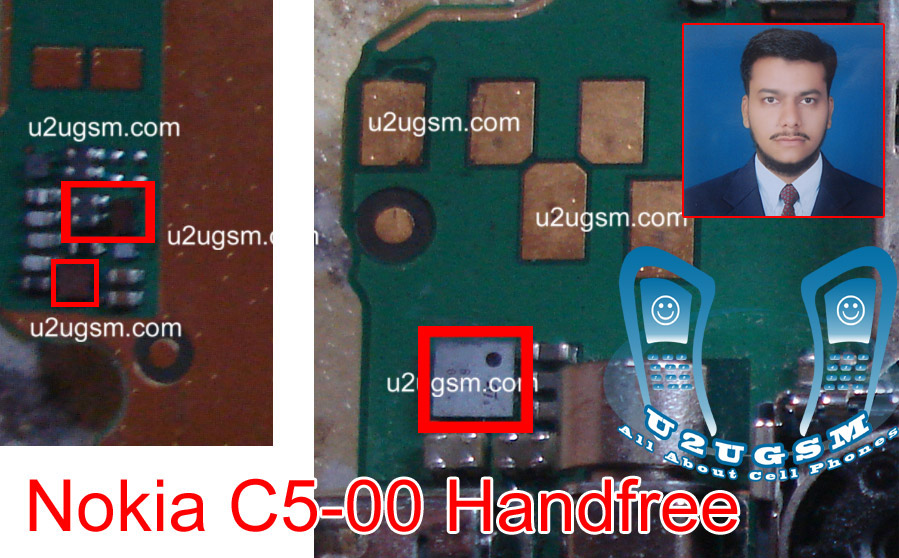
Nokia C5 Handsfree Headset problem solution ways

Nokia C5 handsfree open or headset not working in Nokia C5 can be solve by following the diagram bellow. Look at the diagram bellow and in it you can see some parts that are in line with red color. These parts are used to control head set and head phone in Nokia C5.


Nokia C5 hands free problem can be solve by these few steps that I am posting here.Clean all these components that are used in head set function in Nokia C5. Apply hot air to dry the mother board and keep in mind do not apply much heat because to much heat can damage the mother board or harm you skin.
Re sold and re flow of these parts can also solve the head set hand free problem in Nokia C5.If all above techniques can not solve Nokia C5 head set problem you can replace these parts to solve Nokia C5 handfree problem.

6120c low signal done


6120c low signal done